
Let me paint you a picture: You walk through your front door after a long day, and before you even flip a switch, your home springs to life. Soft ambient lighting gradually illuminates your living room in your favorite warm glow. Your favorite playlist starts playing at just the right volume. The temperature adjusts to your preferred setting. This isn’t science fiction—this is what smart home decor gadgets can do for you right now.
Here’s what I love about the current state of smart home technology: these gadgets aren’t just functional anymore—they’re genuinely beautiful pieces that enhance your home’s aesthetic while making your life easier. Gone are the days when smart home devices looked like clunky tech experiments that you’d want to hide behind furniture. Today’s smart home decor seamlessly blends cutting-edge technology with stunning design that you’ll actually want to show off.
In this comprehensive guide, I’m sharing the 10 best smart home decor gadgets that are absolutely worth buying for you home. These aren’t just the latest gimmicks—these are devices that have proven themselves through rigorous testing, stellar customer reviews, and real-world usability. Whether you’re just starting your smart home journey or you’re looking to upgrade your existing setup, this guide will help you make informed decisions that you’ll love living with every single day.
What Makes a Smart Home Decor Gadget Worth Buying?
Before we dive into the products, let me share what I’ve learned makes a smart home gadget truly worthwhile:
It Has to Look Good – First and foremost, these devices need to be attractive enough that you want them visible in your home. The best smart home decor doesn’t scream “tech gadget”—it whispers “elegant design element.”
Reliability is Non-Negotiable – A smart light that loses connection every other day isn’t smart—it’s frustrating. The gadgets on this list have proven track records of stable, dependable performance.
Easy Setup and Use – If you need an engineering degree to set it up, it’s not making the cut. The best smart home devices work right out of the box and integrate seamlessly with your existing ecosystem (whether that’s Alexa, Google Assistant, or Apple HomeKit).
Real Value, Not Just Features – Having 50 features you’ll never use doesn’t make a gadget valuable. I’m focusing on devices that excel at what they actually do, providing genuine improvements to your daily life.
Ecosystem Compatibility – Your smart home should work together harmoniously. The products I’m recommending play well with multiple platforms so you’re not locked into a single ecosystem.
Now let’s explore the gadgets that check all these boxes and then some.
The Top 10 Smart Home Decor Gadgets Worth Buying
1. Philips Hue Smart Lighting System (Starter Kit with Bridge)
If I had to recommend just one smart home decor gadget to transform your space, this would be it. Philips Hue has earned its reputation as the gold standard of smart lighting, and after testing these bulbs extensively, I completely understand why. The system includes the Hue Bridge hub, multiple bulbs, and sometimes a dimmer switch or button, giving you everything needed to create an intelligent lighting ecosystem.
What makes these bulbs extraordinary isn’t just that they change colors (though having 16 million color options is pretty incredible). It’s how precisely they render those colors, how reliably they respond to commands, and how seamlessly they integrate with virtually every smart home platform. Whether you ask Alexa to dim the lights, set up a Google Assistant routine to wake you with gradually brightening sunrise simulation, or use Apple HomeKit for complex automations, Philips Hue responds instantly every single time.
The ambiance these lights create is genuinely transformative. You can create preset scenes for movie nights, dinner parties, or romantic evenings with a single voice command or tap in the app. The app itself is intuitive and powerful, letting you schedule lights, sync them to music, or even create custom color palettes that match your room’s decor.
Pros:
- Industry-leading reliability with rock-solid connectivity that rarely requires troubleshooting
- Works with all major platforms (Alexa, Google Assistant, Apple HomeKit, SmartThings) plus Matter support
- Exceptional color accuracy and brightness (800-1600 lumens depending on bulb) with smooth dimming transitions
- Extensive ecosystem with light strips, outdoor lights, lamps, and specialty fixtures that all work together seamlessly
- Long lifespan (25,000 hours or 22+ years) and Energy Star certification for efficiency
Cons:
- Premium pricing—starter kits range $99-180, individual bulbs $40-60 each
- Requires Hue Bridge for full functionality (though Bluetooth works for basic single-room setups)
- Initial setup with the Bridge adds an extra step compared to simpler plug-and-play bulbs
2. Google Nest Hub Max (10″ Smart Display)
This is hands-down my favorite smart display, and it’s transformed how I interact with my smart home. The Google Nest Hub Max isn’t just a screen that shows you the weather—it’s a command center, entertainment hub, digital photo frame, and security camera all rolled into one gorgeous package. That 10-inch HD touchscreen is large enough to actually watch cooking videos while you prep dinner or catch up on YouTube while you eat breakfast, but it still maintains an elegant, unobtrusive profile that blends beautifully into any room.
What really sets the Nest Hub Max apart is its built-in Nest Cam functionality. When you’re away from home, you can check the live feed from your phone to see what’s happening in your kitchen or living room. The 6.5MP camera features motion and sound detection, sending alerts when something unusual occurs. But here’s what I love—when you’re home, that same camera becomes incredibly useful for video calls with Google Duo or Zoom, and the auto-framing feature actually tracks your movements so you stay centered in the frame even if you’re moving around the kitchen while chatting with family.
The audio quality genuinely surprised me. The built-in stereo speakers with a subwoofer produce rich, full sound that fills my kitchen without sounding tinny or distorted. YouTube Music, Spotify, and other streaming services sound genuinely good—not just “acceptable for a smart display” but actually enjoyable. Plus, Google Assistant’s voice recognition is phenomenal, understanding me even when I’m speaking at normal volume from across the room with music playing.

- BUNDLE INCLUDES:Google Nest Hub Max with English, Spanish, French, Japanese and Global Language Compatibility so it work…
- IT WORKS EVERYWHERE Easy to use and will automatically start up in English when connecting to your device for the first …
- BLENDS RIGHT INTO YOUR HOME Looks great on a nightstand, shelf, countertop – or the wall. This Nest Hub is small and mig…
Pros:
- Largest screen in Google’s lineup (10″ HD display) perfect for recipes, videos, and controlling smart home devices visually
- Built-in Nest Cam provides home security monitoring with motion/sound alerts and live view access
- Exceptional video calling with auto-framing that tracks your movement during calls
- Superior audio with stereo speakers and 30W subwoofer delivers room-filling sound
- Works as an elegant digital photo frame with automatic ambient lighting adjustment
Cons:
- Expensive at $229 (though frequently on sale for $179-199)
- Camera may be a privacy concern for some users (though it has physical disable switch)
- Google discontinued Zoom support for scheduled meetings, limiting some remote work functionality
- Screen resolution (1280×800) is adequate but not exceptional by modern tablet standards
3. Nanoleaf Shapes or Lines (Modular Smart Lighting Panels)
If you want your walls to become interactive art, Nanoleaf is the answer. These modular LED panels mount directly to your walls and create stunning, customizable light displays that are part decor, part functional lighting, and entirely mesmerizing.
What makes Nanoleaf special is the modular design—you start with a starter kit of 5-10 panels, then expand infinitely by adding more panels in different shapes (hexagons, triangles, mini triangles, or lines). You arrange them in whatever geometric pattern speaks to you, creating a completely unique installation that’s impossible to replicate. The panels connect together physically and electrically, so your entire creation acts as one unified light show.
The lighting effects are where Nanoleaf truly shines (pun intended). You can set solid colors across all panels, create flowing gradients that wash across your design, sync the lights to music so they pulse and change with the beat, or even use the Screen Mirror feature to extend your desktop display onto your wall panels. The app includes dozens of preset scenes created by the community, and the Touch controls let you tap any panel to cycle through scenes. There’s even a Rhythm mode that uses a built-in microphone to sync lights to ambient music.
Pros:
- Infinitely customizable geometric designs let you create truly unique wall art installations
- Stunning visual effects with 16+ million colors per panel and smooth color transitions
- Music synchronization creates immersive experiences perfect for entertaining or gaming
- Works with all major voice assistants (Alexa, Google, Siri, SmartThings) plus Matter support
- Touch-enabled panels can control scenes, brightness, and power with simple taps
Cons:
- Premium pricing—starter kits range $200-300, expansion panels $60-80 per 3-pack
- Installation requires mounting adhesive strips or screws on your walls (removal can damage paint)
- Bright, dynamic effects may be distracting in bedrooms or spaces meant for relaxation
- Some users report occasional connectivity issues requiring controller resets
4. Amazon Echo Show 8 (3rd Gen, 2023) – Smart Display
While I love the Google Nest Hub Max, I have to give Amazon credit—the Echo Show 8 is an absolutely fantastic alternative, especially if you’re already invested in the Alexa ecosystem. This 8-inch smart display hits a perfect sweet spot: large enough to be genuinely useful for video calls and watching content, yet compact enough to fit on a nightstand, kitchen counter, or desk without dominating the space.
The 2023 third-generation model brought significant improvements, including spatial audio that makes music and videos sound noticeably fuller and a centered camera that produces much better video call quality. That 13MP camera with auto-framing keeps you centered during calls on Zoom, Skype, or Amazon’s own communication features. What I particularly appreciate is the physical camera cover—slide it over when you want privacy, slide it back when you’re ready for video calls. It’s a simple feature that provides real peace of mind.
Alexa’s capabilities on the Echo Show 8 are extensive. You can watch Prime Video, Netflix, Hulu, and YouTube (though navigating YouTube requires voice commands since there’s no official app). The display shows useful glanceable information like calendar events, weather, and news headlines. For smart home control, the visual interface makes it easy to see all your connected devices at once and tap to control them. I particularly love using it as a digital photo frame—connecting it to Amazon Photos lets it cycle through your favorite memories with beautiful full-screen display.

- Bundle includes. Echo Show 8 (2025 release) & Amazon Adjustable Stand.
- Powerfully smart, beautifully built. The redesigned 8.7“ smart display features a vibrant HD touchscreen, built-in smart…
- Alexa+ now on Echo Show 8. Get access to the smarter, more useful Alexa when you buy this device. Opt in to Alexa+ Early…
Pros:
- Perfect size balance (8″ HD display) works in multiple rooms without feeling oversized
- Excellent 13MP camera with auto-framing for natural video calls
- Spatial audio technology delivers surprisingly good sound for music and videos
- Physical camera cover provides tangible privacy protection
- Deep integration with Amazon services (Prime Video, Music, Photos, Shopping)
Cons:
- Alexa ecosystem integration less comprehensive than Google Assistant for some smart home brands
- YouTube requires voice control without dedicated app interface
- Occasional lag when switching between apps or services
- Prime membership required to fully utilize many entertainment features
5. Govee Uplighter Floor Lamp / Govee Outdoor Post Light
Govee has absolutely revolutionized smart lighting with products that combine stunning design, incredible functionality, and surprisingly affordable pricing. Whether you choose the Uplighter Floor Lamp for indoor ambiance or the Outdoor Post Light for patio/garden illumination, you’re getting a showstopping piece that’s as much sculpture as light fixture.
The Uplighter Floor Lamp is a minimalist’s dream—a sleek vertical tube that washes your wall with customizable color gradients, creating dramatic ambient lighting that transforms any room. The lamp features multiple color zones that can display different colors simultaneously, creating gorgeous gradient effects that flow up your wall.
The Outdoor Post Light brings that same magic to your exterior spaces. The modular design lets you stack poles to your desired height (up to 6 feet), and the variety of mounting options—temporary stakes, semi-permanent ground anchors, or permanent concrete mounts—means you can use it anywhere from a rented apartment patio to a permanent landscape installation. The weatherproof construction withstands rain, snow, and extreme temperatures, and the extensive library of lighting themes in the Govee app includes everything from gentle candlelight simulation to vibrant rainbow displays to music-synchronized effects.
Pros:
- Stunning visual impact that elevates any space from ordinary to extraordinary
- Extensive customization with millions of colors, dynamic effects, and music synchronization
- Govee app is intuitive with dozens of preset themes and easy custom scene creation
- Affordable pricing compared to premium smart lighting alternatives (Philips Hue, LIFX)
- Works with Alexa and Google Assistant for voice control
Cons:
- Govee app can feel cluttered with too many features and themes to navigate
- Some users report WiFi connectivity issues requiring occasional router proximity
- No Apple HomeKit support (Alexa and Google only)
- Outdoor Post Light requires outdoor electrical outlet access
6. TP-Link Kasa Smart Plugs (4-Pack)
These unassuming little plugs might not look like much, but they’re absolute game-changers for building a smart home on a budget. Smart plugs are the gateway drug to home automation—they instantly transform any “dumb” device into a smart device you can control with your phone or voice.
What I love about the TP-Link Kasa plugs specifically is their reliability. I’ve used several cheaper smart plug brands that lose WiFi connection constantly or fail to respond to voice commands half the time. The Kasa plugs, in contrast, just work. Every single time. You plug them in, connect them to your WiFi through the straightforward Kasa app, and they become a permanent, dependable part of your smart home that you genuinely forget is there because it never requires troubleshooting.
The app is clean and functional, letting you create schedules (lights on at sunset, coffee maker on at 6:30 AM), set away mode to randomize light patterns when you’re traveling, and monitor energy usage for each plugged-in device. Voice control works flawlessly with Alexa and Google Assistant—”Alexa, turn on the living room lamp” becomes such a natural part of your routine that you’ll wonder how you ever got up to flip switches manually.
Pros:
- Exceptional value—four-pack typically $30-40, making each plug $8-10
- Rock-solid reliability with stable WiFi connection and responsive voice control
- Energy monitoring shows real-time and historical usage plus estimated cost savings
- Compact design doesn’t block adjacent outlets on power strips or wall plates
- Scheduling and away mode enable genuine home automation without complicated scenes
Cons:
- Lacks Apple HomeKit support (Alexa and Google only)
- No USB charging ports like some competing smart plugs offer
- Basic white plastic design isn’t particularly attractive (though small enough to hide)
- Individual device control only—no grouped smart plug scenes in Kasa app
7. SwitchBot Curtain (3rd Gen) – Smart Curtain Opener
This little robot is pure magic. The SwitchBot Curtain clamps onto your existing curtain rod (works with both rod and rail types) and quietly, automatically opens or closes your curtains on command. No rewiring, no electrician, no complicated installation—just clip it on, pair it with the app, and suddenly you have motorized smart curtains.
Why is this so transformative? Picture this: You wake up gradually to your alarm, and as you stir, your curtains automatically glide open, letting natural sunlight flood your bedroom instead of harsh overhead lights. In the evening, as sunset approaches, they close automatically for privacy. When you leave for vacation, they open and close on randomized schedules to make your home look occupied. It’s the kind of ambient automation that feels genuinely futuristic.
The SwitchBot Curtain is remarkably clever in its execution. It uses a built-in light sensor to automatically open curtains at sunrise and close them at sunset if you enable that feature. You can set schedules down to the minute, or control them manually through the app or voice commands with Alexa or Google. The device is battery-powered (rechargeable USB-C) and lasts 6-8 months on a charge, or you can add the optional solar panel accessory for essentially infinite power. The motor is whisper-quiet—you hear the curtain fabric moving, but not the mechanism itself.
Pros:
- Transforms any curtain into a smart curtain with no permanent modification or wiring
- Multiple control options: app, schedules, light sensor, voice commands, physical button
- Works with both curtain rods and rails via different attachment modes
- Quiet operation won’t wake you when curtains open in the morning
- Solar panel accessory option eliminates need for recharging
Cons:
- Expensive for a single motor ($89) and most windows need two (one for each curtain panel)
- Setup can be finicky—finding the right position and tension requires trial and error
- Curtain weight limits (17.6 lbs) may not work for heavy blackout or thermal curtains
- SwitchBot Hub required for remote control away from home and voice assistant integration
8. Meural Canvas II (Digital Art Frame)
If you appreciate art but don’t have thousands to spend on originals, the Meural Canvas II is absolutely breathtaking. This isn’t just a digital photo frame—it’s a legitimate art display system that showcases museum-quality reproductions of masterpieces from around the world, your own photography, or curated collections from professional artists. The matte finish display and anti-glare coating create the illusion that you’re looking at an actual painting, not a screen.
What elevates the Meural Canvas beyond typical digital frames is the curated content library. Your purchase includes access to over 30,000 works of art from museums, galleries, and living artists—everything from Van Gogh and Monet to contemporary photography and abstract digital art. The library is organized into collections by artist, period, style, or mood, making it easy to create your own rotating gallery. You can also upload unlimited personal photos, and the frame’s powerful image processing optimizes them for display.
The frame itself is a work of art. Available in multiple sizes (16″, 21″, 27″, and 32″), it comes with interchangeable frames in classic black, walnut, white, or silver finishes that you swap out depending on your decor. The gesture controls are elegantly implemented—wave your hand in front of the canvas to skip to the next piece, and swipe right or left to navigate collections. There’s also a physical remote and full app control.

- PASSION FOR ART: Meural Canvas II combines modern design, state-of-the-art technology, and passion for art all over the …
- SLEEK MODERN DESIGN: Meural Canvas II is designed for any space. It has a sleek, modern-meets-classic design and comes i…
- SHOWCASE YOUR OWN PHOTOS: Easily upload, crop and view your own photography in its fullest and richest detail, and save …
Pros:
- Museum-quality display with matte finish and anti-glare coating mimics real canvas
- Access to 30,000+ artworks from major museums and contemporary artists
- Multiple size options (16″ to 32″) fit various spaces and budgets
- Interchangeable frames let you match your decor without replacing the entire unit
- Smart scheduling rotates collections automatically throughout the day
Cons:
- Premium pricing-frames range $400-800 depending on size
- Requires subscription ($49/year) to access full art library after initial period
- No battery option—must remain plugged in constantly
- Some users report occasional WiFi connectivity issues requiring restarts
9. Ecobee SmartThermostat Premium
Your thermostat might not seem like “decor,” but hear me out—the Ecobee SmartThermostat Premium is so beautifully designed and functionally impressive that it becomes a conversation piece rather than something you ignore on the wall. The large, responsive touchscreen displays gorgeous high-resolution images that change throughout the day, making it as much a small digital art piece as a climate control device.
What makes the Ecobee Premium exceptional is its intelligence. Built-in sensors detect occupancy and temperature in the room where the thermostat is installed, and you can add remote sensors (included in the premium kit) to other rooms for whole-home climate balancing. The system learns your schedule and preferences, automatically adjusting temperatures when you’re home, asleep, or away. I’ve genuinely seen my energy bills drop since installation—the system’s optimization really does save money while keeping you more comfortable.
The smart home integration is extensive. In addition to controlling climate, the Ecobee Premium includes a built-in Alexa speaker, so it functions as an Echo device that can play music, answer questions, and control other smart devices. The air quality monitor tracks VOCs (volatile organic compounds), humidity, and temperature, alerting you when ventilation is needed or filters need changing. For premium subscribers, SmartSensor technology can even detect when you’re approaching a room and pre-condition it to your comfort temperature before you arrive.

- Save up to 26% per year on heating and cooling costs. ENERGY STAR certified. Included SmartSensor (50 dollar value) adju…
- Built-in air quality monitor alerts you to poor air quality, provides tips on how to improve it, and reminds you when it…
- Secure your home’s doors and windows with contact sensors that monitor entry, exit, and motion
Pros:
- Intelligent climate control with occupancy sensing and learning algorithms reduces energy costs
- Included remote sensors balance temperature across multiple rooms instead of single-point measurement
- Built-in Alexa speaker provides voice control and smart home integration
- Air quality monitoring tracks VOCs, humidity, and provides actionable recommendations
- Beautiful touchscreen display doubles as a small digital photo frame
Cons:
- Expensive at $249 compared to basic programmable thermostats ($50-100)
- Installation can be complex—may require professional electrician if no C-wire exists
- Some smart features require ongoing subscription ($10/month or $100/year)
- Alexa integration less seamless than standalone Echo devices for some functions
10. Roborock S8 MaxV Ultra (Robot Vacuum with Auto-Empty)
Okay, a robot vacuum might seem like an odd choice for a “decor” gadget, but stay with me. The Roborock S8 MaxV Ultra isn’t just functional—it’s a beautiful piece of industrial design that looks like it belongs in a design museum. More importantly, it fundamentally changes how your home feels by ensuring floors are constantly clean without you thinking about it. Clean floors = beautiful home, and this robot makes that happen automatically.
What sets the S8 MaxV Ultra apart from basic robot vacuums is the sheer comprehensiveness of its automation. The charging dock isn’t just a charging dock—it’s a full self-maintenance station. The robot automatically empties its dustbin into a sealed bag (holds 7 weeks of debris), refills its water tank for mopping, dispenses cleaning solution, washes its mop pads with hot water after cleaning, and dries them with warm air to prevent odor. You literally don’t touch the robot for weeks at a time.
The cleaning performance is exceptional. LiDAR navigation creates precise maps of your home, and the FlexiArm Design extends a side brush and mop to reach edges and corners that other robots miss. You can schedule different rooms to be cleaned at different times, create no-go zones around pet bowls or play areas, and even set different suction power and mop moisture levels for different floor types. Voice control through Alexa or Google lets you start cleaning sessions without opening the app.
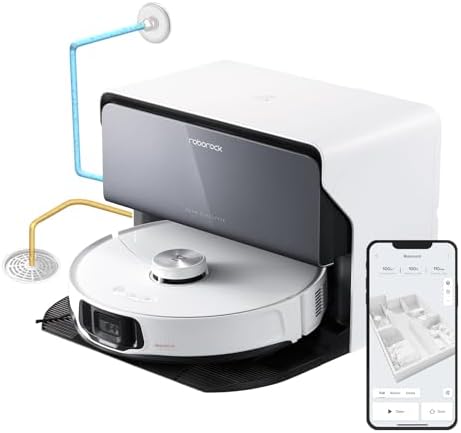
- Note: Roborock S8 MaxV Ultra with Refill & Drainage System means the dock will automatically fill and drain water. Pleas…
- The All-in-One RockDock Ultra: With hot water mop washing, stubborn and greasy stains are easily dissolved from the mop….
- Intelligent Dirt Detection: During mop washing, detection checks how dirty the mops are to decide if they need to be was…
Pros:
- RockDock Ultra handles all maintenance automatically—empties, refills, cleans, dries for weeks of hands-off operation
- Exceptional cleaning performance with 10,000Pa suction and extending FlexiArm for edge/corner cleaning
- Intelligent navigation avoids obstacles, maps multiple floors, and cleans systematically
- Optional drainage connection for completely automated water management
- Matter support ensures long-term compatibility with future smart home standards
Cons:
- Premium pricing at $1,400-1,600 is a significant investment
- Dock station is large (about 16″ wide, 20″ deep) and requires dedicated space
- Initial mapping and setup requires time to optimize for your home layout
- Requires regular consumables (dust bags, cleaning solution, mop pads, filters)
How to Choose the Right Smart Home Decor Gadgets
With so many options available, here’s my framework for making smart purchases:
1. Start with Your Ecosystem
First, decide which voice assistant you want as your primary control system:
- Amazon Alexa – Widest device compatibility, strongest for shopping and entertainment
- Google Assistant – Best for search/information, excellent voice recognition
- Apple HomeKit – Premium integration for iPhone users, strong privacy focus
Most devices work with multiple systems, but your primary ecosystem should guide your choices.
2. Begin with Lighting
If you’re just starting, smart lighting gives you the biggest impact for your investment. A few smart bulbs or a lightstrip can completely transform how your space feels. Start with:
- Philips Hue for premium quality and reliability
- TP-Link Kasa for budget-friendly options
- Govee for decorative lighting and wow factor
3. Add a Smart Display as Your Command Center
Once you have a few smart devices, a display becomes incredibly useful:
- Google Nest Hub Max for best overall experience
- Echo Show 8 if you’re Alexa-focused
- Either works as a control panel, entertainment device, and digital photo frame
4. Expand Based on Your Lifestyle
Add gadgets that solve your specific pain points:
- Hate vacuuming? Robot vacuum
- Always too hot/cold? Smart thermostat
- Love art but can’t afford originals? Digital art frame
- Forget to open/close curtains? Smart curtain opener
5. Quality Over Quantity
It’s better to have 5 excellent, reliable smart devices than 20 cheap ones that constantly malfunction. Invest in reputable brands with good customer support and established track records.
Things to Consider Before Buying Smart Home Decor
WiFi Network Strength and Capacity
Smart home devices require reliable WiFi, and adding dozens of them can strain basic routers. Before investing heavily in smart home gadgets, ensure your WiFi network can handle the load. Most modern mesh WiFi systems (like Google WiFi, Eero, or AmpliFi) easily accommodate 50+ smart devices. If your current router struggles with basic internet usage, upgrade it before adding smart home devices. Position your router centrally in your home or add mesh extenders to ensure every room has strong signal.
Privacy and Security Concerns
Smart home devices with cameras and microphones inherently raise privacy questions. Look for devices with physical privacy controls (camera covers, mic mute switches) and strong encryption standards. Research each manufacturer’s data practices—reputable companies like Google, Amazon, Apple, and Philips publish clear privacy policies and regularly update security. Consider your comfort level: some people love having smart cameras for security monitoring, while others prefer devices without cameras entirely. There’s no wrong answer—choose what aligns with your values.
Installation Requirements and Complexity
Smart bulbs screw into existing sockets (easy). Smart thermostats may require rewiring (complex, potentially needs electrician). Before purchasing, research installation requirements. Many devices claim “DIY-friendly” installation but still require comfort with basic electrical work. Don’t be afraid to hire professionals for complex installations—improper wiring can cause expensive damage or safety hazards. Budget for professional installation if needed rather than attempting installations beyond your skill level.
Ongoing Costs and Subscriptions
While most smart home devices work fine without subscriptions, premium features often require ongoing payments. Smart cameras typically need subscriptions for cloud storage ($3-10/month). Smart thermostats offer enhanced features with subscriptions ($10/month). Digital art frames require subscriptions for full art libraries ($50/year). Factor these recurring costs into your decision—a “cheaper” device with mandatory expensive subscriptions may cost more long-term than a pricier device with no subscription requirements.
Compatibility and Future-Proofing
The smart home landscape is rapidly evolving. Matter support (a new universal standard) ensures devices will remain compatible with future platforms. When possible, choose Matter-compatible devices or products from major manufacturers likely to support emerging standards. Avoid bargain brands with proprietary apps and limited integration—when that company folds or stops supporting their app, your devices become expensive paperweights. Stick with established brands: Philips, Google, Amazon, TP-Link, Ecobee, Samsung, etc.
Conclusion:
Here’s what I’ve learned after years of building and refining my smart home: the best smart home decor doesn’t feel like “technology”-it feels like your home finally works the way it should. Lights that automatically adjust throughout the day to support your circadian rhythm. Thermostats that ensure you’re always comfortable without constantly fiddling with controls. Robots that handle tedious chores so you can focus on things you actually enjoy.
Start small. You don’t need to automate everything at once. Buy one or two devices that address your biggest pain points or bring you the most joy. Learn how they work, integrate them into your routines, and then expand gradually. Some of the best smart home experiences come from simple automations—your favorite playlist starting when you arrive home, lights dimming automatically for movie night, curtains closing at sunset for privacy.
Remember—your smart home should work for you, not the other way around. Choose devices that align with your lifestyle, aesthetic preferences, and budget. Don’t chase trends or feel pressured to automate everything. The best smart home is one that fades into the background, quietly making your life better without demanding constant attention. Happy Decorating!